 Platforms · Bright Commerce
 Run the catalog without touching the storefront.
Bright Commerce separates product management from the customer-facing website, letting organizations manage products, pricing, inventory and integrations without straining production systems. It is the operational backbone for commerce businesses that have outgrown a single storefront.
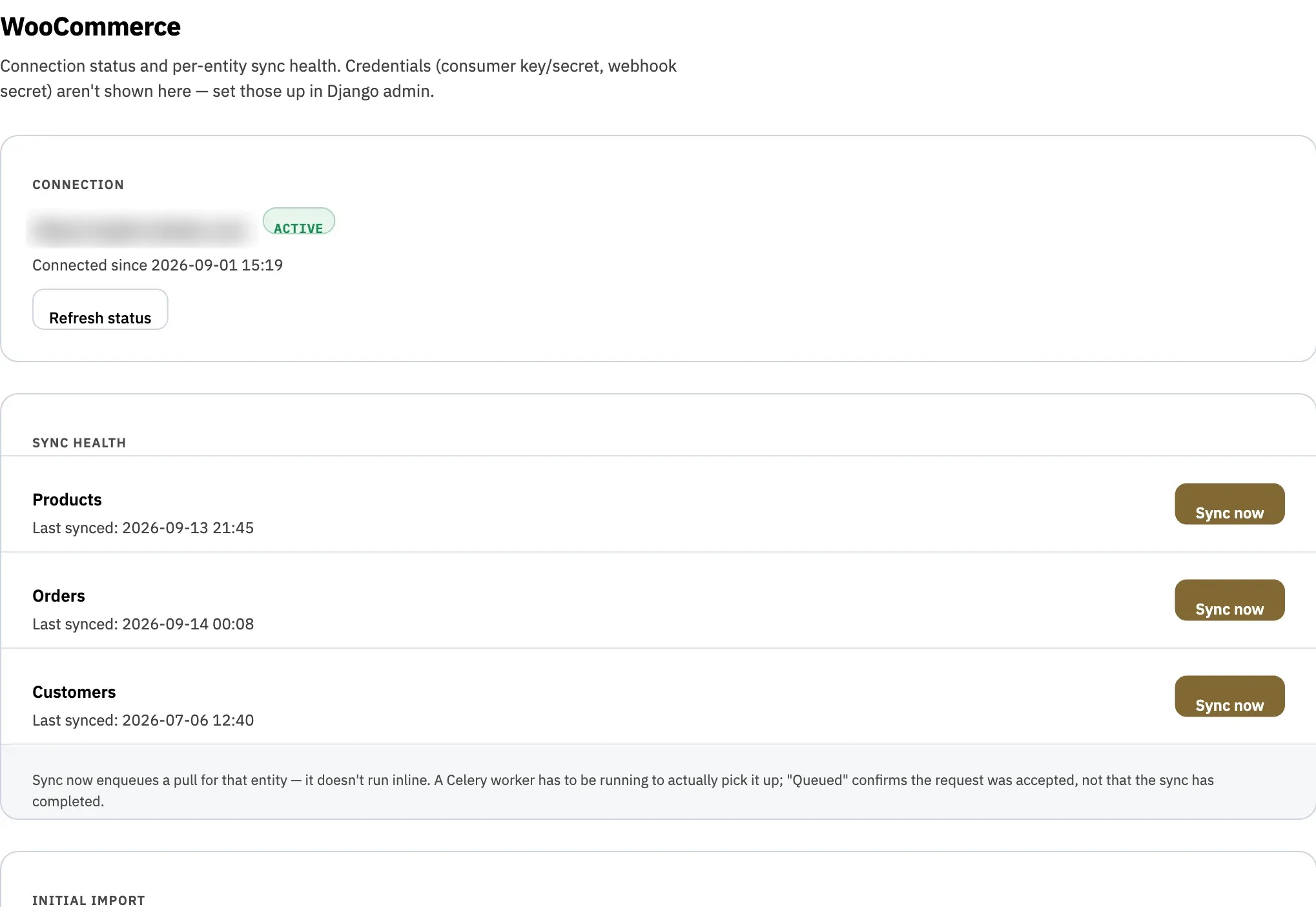
Four products edited here were pushed to the storefront. One product changed in both places and is waiting on you.
- Products 2 min ago
- Orders 12 min ago
- Customers 14 min ago
- Conflicts 1 to resolve
- 8,920 In stock
- 1,406 Out of stock
What is Bright Commerce?
Bright Commerce is a product information and commerce operations platform. It keeps the catalog (products, pricing, inventory and images) in its own workspace, syncs products both ways with a WooCommerce store, mirrors orders and customers, and lets teams approve AI-proposed changes before anything reaches the storefront.
Your storefront was built to sell. Not to run the catalog.
-
Why does changing a price mean logging into the live store?
Bright Commerce answers this -
A product changed here and in the store. Which version is right?
Bright Commerce answers this -
How much of the catalog is actually in stock right now?
Bright Commerce answers this -
What did an AI change on our products, and who approved it?
Bright Commerce answers this -
Can we manage tens of thousands of products without slowing the site customers use?
Bright Commerce answers this -
Where do orders and customers stand without exporting a spreadsheet?
Bright Commerce answers this
Bright Commerce moves the work off the storefront, so the catalog can grow without straining the site customers shop on.
Connect the store. Manage the catalog. Approve what changes.
- 01 · Connect
Connect the store once
Point Bright Commerce at a WooCommerce store. Products sync both ways, while orders and customers are mirrored read-only, each on its own schedule, with its own health check.
- Two-way product sync
- Orders and customers mirrored
- Store credentials encrypted at rest
- 02 · Manage
Manage the catalog off the storefront
Search, filter and edit products, pricing, stock and images in a workspace built for large catalogs, and every save pushes to the store in the background, without ever blocking the edit.
- Search by title, author, publisher or condition
- Collections and filters for any catalog
- Every save queued to the storefront

- 03 · Approve
AI suggests. People approve.
AI agents can propose product changes, but nothing is applied until someone approves it. The products keep their current values and the storefront stays unchanged until then.
- Pending, applied, rejected and stale
- Nothing changes until it's approved
- Every change on the audit log

A workspace for the catalog, not the checkout
Built for teams who manage thousands of products and need the storefront to stay fast while they do.
Built for large catalogs
Collections, author lists and search across title, author, publisher and condition, with stock, price and year at a glance.
 1 Collections for every way you sell 2 Search title, author, publisher or condition 3 Authors grouped automatically
 - 1 Collections for every way you sell
- 2 Search title, author, publisher or condition
- 3 Authors grouped automatically
Your brand, store-wide
Accent colour, heading and body text colour, logo and typeface, previewed live and applied across the app, including the sign-in page.
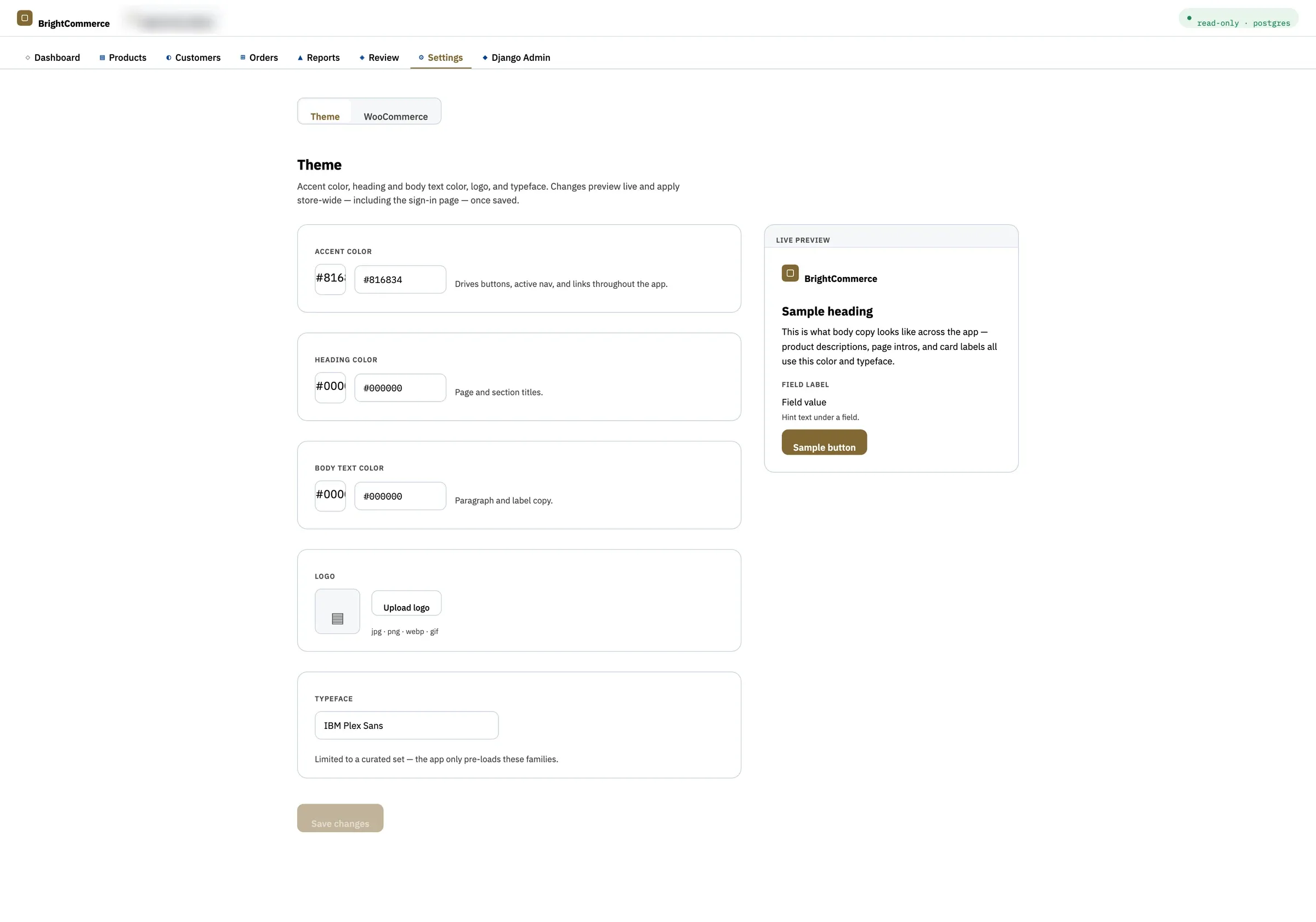 1 Brand colours, store-wide 2 Changes preview live 3 A curated set of typefaces
 - 1 Brand colours, store-wide
- 2 Changes preview live
- 3 A curated set of typefaces
Edit once. The store keeps up, and so do you.
Every product change here is pushed to the storefront, and every change made in the store comes back on a schedule, with webhooks as a fast path. Nothing is silently overwritten.
If a product changed in both places, it's flagged as a conflict. You choose to keep yours or accept the store's.
- 1Conflicts, never overwrites
When the same product changes in both places, Bright Commerce stops and asks instead of guessing.
- 2The store stays authoritative for orders
Orders and customers are read-only mirrors, so nothing here can compete with what the store records.
- 3Each business, its own database
Every tenant's data lives in its own isolated database schema, so a cross-tenant query can't happen by accident.
Everything the catalog touches, in one place
Credentials stay encrypted at rest, and every business gets its own isolated schema.
- WooCommerce products
- WooCommerce orders
- WooCommerce customers
- Product images and galleries
- Imports and exports
- AI agents (proposals only)
Products, pricing, inventory and integrations, managed in one place, separate from the site customers shop.
- A storefront that stays in sync
- Conflicts flagged, never overwritten
- Sales, inventory and sync-health reports
- Every change on the record
Commerce teams that have outgrown a single storefront
- 01
Growing retailers
Businesses whose catalog has outgrown being managed inside the live store.
- 02
Catalog and merchandising teams
Edit products, pricing, stock and images without touching the site customers use.
- 03
Owners and operators
Sales, inventory and sync health in one place, with every change on the record.
Questions about Bright Commerce
Which storefronts does Bright Commerce work with?
WooCommerce today. Each business connects its store with a read/write API key, and the credentials are encrypted at rest.
How does two-way sync work?
Every product saved in Bright Commerce is pushed to the store in the background. The store is also checked for changes on a schedule (every 15 minutes by default), and signed webhooks can deliver changes faster when they're set up.
What if a product changes in both places?
It's flagged as a conflict instead of being overwritten, and you choose whether to keep the Bright Commerce version or accept the store's.
Can we edit orders and customers?
No. They're read-only mirrors of the store, each synced on its own schedule, because the store is always the authority for orders and customers.
Can we create new products in Bright Commerce?
Yes. A product created in Bright Commerce is created in the store on its first push. Products created directly in the store's own admin aren't imported automatically yet.
How do AI-proposed changes work?
AI agents can propose product changes, but nothing is applied until someone approves it. The product keeps its current values and the storefront is unchanged until then. Each proposal is pending, applied, rejected, stale or failed.
Does it sync product images?
Yes. Featured images and galleries sync with the store. Uploaded photos need public storage such as S3 so the store can fetch them; if it can't, the push fails loudly instead of silently dropping the photo.
Can more than one business use it?
Yes. Each business gets its own isolated database schema, so one business's data can't be reached from another's by accident.
Can it be branded?
Yes: accent colour, heading and body text colour, logo and typeface, applied across the app, including the sign-in page.
How can we see Bright Commerce on our catalog?
Request a demo and we'll walk through Bright Commerce with you.
Where Bright Commerce fits
More platforms
- TIP Business and agency operations, unified. →
- Continuum Cited, agentic AI memory for legal and financial work. →
- SchoolTracker.ai Marketing intelligence, trusted by 300+ school brands. →
- Shepard Church management software that tells staff what needs attention. →
- Helm A live financial operating system. →